Blog
Updated 23 October 2026
Replacing the GloriaFood order-taking app: a job-by-job handover
By Arslan Munir
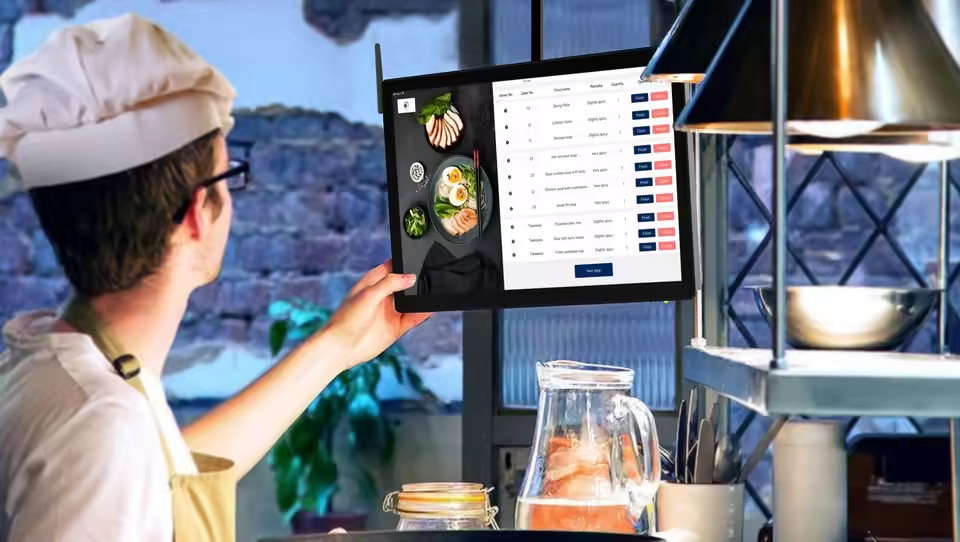
Most GloriaFood migration advice is about the menu, the domain and the ordering button. Those matter, and there are links to each below. But on the night you switch, what your staff actually use is the device by the pass. If nobody knows how to say "45 minutes" or "sold out" in the new app, the first busy Friday will show it.
This page covers that one job. For the full timeline, start with the GloriaFood shutdown guide. If you haven't picked a system yet, compare options on the GloriaFood alternative page or in Chefzi vs GloriaFood. Chefzi isn't affiliated with GloriaFood or Oracle.
When the GloriaFood app stops
Oracle's GloriaFood FAQ (checked on 23 October 2026) gives the dates:
- End of life: 30 April 2027.
- Your account's last day: services end when your current renewal expires, somewhere between 1 and 30 April 2027.
- After that: customers can no longer order through your GloriaFood website, Facebook page or branded app. So the order-taking app has nothing left to receive.
- Your data: you can retrieve it for 30 days after expiry.
Check your own renewal date in the GloriaFood admin. That date, not 30 April, is your real deadline.
What the GloriaFood app does for you today
GloriaFood's own pages (captured 23 October 2026) describe these jobs. Tick the ones your kitchen actually uses.
| Job | How GloriaFood describes it |
|---|---|
| New order alert | A visual and sound notification for each new order, with repeat alerts if the app can't be reached |
| Accept with a time | The customer is told when the order is accepted |
| Reject | Reject an order with a reason |
| Order lists | Orders grouped as All, In progress and Ready, swipe to mark ready |
| Out of stock | Mark items, choices and add-ons as out of stock |
| Pause services | Pause specific services or opening hours, with a message banner for customers |
| Test order | Create a test order from the options menu |
| Printing | Auto-print accepted orders to supported thermal printers by USB, Bluetooth or network, or print by email |
| Table bookings | Reservations and pre-orders arrive in the same app |
Most kitchens use four or five of these. Find out which ones, because those are the ones your staff will miss.
The handover map
This is what replaces each job in Chefzi. Where we haven't published a detail, the table says so rather than guessing.
| Job | In Chefzi |
|---|---|
| New order alert | The Chefzi app keeps ringing until someone accepts or rejects. One buzz isn't the end of it |
| Accept with a time | Accepting asks for a prep time, and that's the time the customer sees |
| Reject | Rejecting asks for a reason, such as sold out, too busy or closed, and the customer is told |
| Device goes quiet | The dashboard shows a warning if the device stops responding. Ordering stays open until you pause it |
| Sold out | Mark the item sold out on the menu. Whether you can do this for a single add-on is a detail to check on your call |
| Pause | Pause ordering in the dashboard, and resume it with one action. Unplugging the tablet doesn't close the shop |
| Test order | We ring a test order to your device on the setup call |
| Printing | The app can talk to a Bluetooth printer you choose. Every order also gets a PDF receipt you can download and print. If you use a particular thermal printer, ask us to test it before you rely on it |
| Table bookings | Table reservations send booking notifications to the same Chefzi app. Moving the bookings themselves is in replace GloriaFood table reservations. If those bookings come from TheFork, the fee comparison is on the TheFork alternative |
| Seated orders | QR table ordering sends a seated guest's order to the same app, tagged with the table |
| End of day | Receipts and daily totals show orders, revenue and average basket, and you can export them |
Two differences to tell staff about before the first shift:
- It doesn't stop ringing. That's on purpose. Someone has to accept or reject every order. If your team is used to letting an alert go and checking later, they'll notice this straight away.
- Pausing is a dashboard job. Show the person who closes up where the pause and resume controls are.
Switching the device over
Do this on a quiet weekday afternoon, not on a Friday.
- Keep the device. The Chefzi app runs on the phone or tablet you already own. If you're thinking of changing the hardware anyway, read the kitchen tablet guide first.
- Install Chefzi alongside GloriaFood. Don't remove anything yet. Turn the volume up on both and check you can tell the two sounds apart from the fryer.
- Take a test order. Order something with paid extras. Accept it with a prep time and check what the customer screen says. Reject a second test order with "sold out" and check the customer is told.
- Print one ticket. If you print, put one order with extras and a delivery address through your printer and read it from the pass. If the printer doesn't connect, sort it now, while GloriaFood is still taking the orders.
- Teach three actions. Accept with a time, reject with a reason, and pause in the dashboard. Every person who answers the device should do each one once.
- Move the links. New orders only arrive in Chefzi once customers use your Chefzi ordering page. See how to replace the GloriaFood ordering button, along with Google, social and QR links.
- Watch both apps. For a few days, orders can arrive in either app. Someone who knows both has to be on the pass.
- Retire GloriaFood last. Once no GloriaFood orders have come in for a full trading week, and the last one has been finished, pause GloriaFood services. Export what you need within your account's 30-day retrieval window. Only then delete the app.
The other moves the app depends on
A new kitchen app is only useful once the rest is in place:
- Menu: move a GloriaFood menu without retyping it, or use the GloriaFood menu converter. Check extras that change the price, because those are the ones that cause refunds.
- Card payments: move GloriaFood card payments to Stripe. You can connect an existing Stripe account to Chefzi.
- Ordering page: your online ordering page is where customers order. The app is where those orders arrive.
- The full checklist: migrate from GloriaFood.
Move the kitchen app with Chefzi
Early Black Friday & Cyber Monday Deal: new sign-ups get 3 months free, with no setup fee. The deal ends at 23:59 on 1 December 2026.
After the free period, Chefzi is £19 a month for cash or no-card ordering, or £29 a month with online card payments through Stripe, per location, excluding VAT. Standard Stripe fees apply. There's no setup fee, no commission and no contract term. The app is included, with no hardware to buy. See Chefzi pricing and what Chefzi does not do.
Frequently asked questions
Will the GloriaFood order-taking app stop working?
Yes. Oracle's GloriaFood FAQ gives an end-of-life date of 30 April 2027, with each account's services ending when its renewal expires between 1 and 30 April 2027. After that, customers can no longer order through your GloriaFood website, Facebook page or branded app, so no new orders will reach the GloriaFood order-taking app.
Can I keep using the same phone or tablet?
Usually, yes. The Chefzi app runs on a phone or tablet you already own, so the device by the pass can stay where it is. Install the Chefzi app next to the GloriaFood one, test it, then remove the GloriaFood app only after the last GloriaFood order has been handled.
What replaces accepting an order with a time?
In the Chefzi app, accepting an order asks for a prep time, and that is the time the customer sees. Rejecting asks for a reason, such as sold out, too busy or closed, and the customer is told. The app keeps ringing until someone accepts or rejects.
Does Chefzi print kitchen tickets like GloriaFood?
The Chefzi app can talk to a Bluetooth printer the restaurant chooses, and every order also gets a PDF receipt you can download and print. If you rely on a particular thermal printer with GloriaFood, ask us to test that model on a call before switching. We have not published a list of supported printer models.
Should I run both apps at the same time?
For a short time, yes, but only while someone is watching both devices. GloriaFood orders keep arriving until you change every ordering button and link, so leave the GloriaFood app running until the last order placed through GloriaFood has been accepted and finished.
Sources
| Claim | Source | Accessed |
|---|---|---|
| GloriaFood end of life 30 April 2027; services end at renewal expiry 1 to 30 April 2027; no ordering on GloriaFood website, Facebook page or branded app afterwards; data retrievable for 30 days | https://www.oracle.com/webfolder/dms/prod/d3/FAQs-GL.pdf (sources/b10/oracle-gloriafood-eol-faq.*) | 23 Oct 2026 10:08 PKT |
| GloriaFood app: notification per order, customer told on acceptance, reservations and pre-orders in the same app, out of stock, pause services | https://www.gloriafood.com/restaurant-order-taking-app (sources/b11/gf-order-app.*) | 23 Oct 2026 15:05 PKT |
| Visual and sound alerts, repeat alerts when the app can't be reached | https://www.gloriafood.com/benefits-for-restaurants (sources/b11/gf-benefits.*) | 23 Oct 2026 15:05 PKT |
| Test order, pause with message banner, All / In progress / Ready, out of stock for items, choices and add-ons, reject with reason, auto-accept with printers | https://www.gloriafood.com/order-taking-app-for-restaurants (sources/b11/gf-order-app-features.*) | 23 Oct 2026 15:05 PKT |
| Thermal printing by USB, Bluetooth or network; email printing | https://www.gloriafood.com/auto-printing-setup-2 (sources/b11/gf-printing.*) | 23 Oct 2026 15:05 PKT |
| Chefzi app: rings until accept or reject, prep time, reject reasons, dashboard warning, pause in dashboard, Bluetooth printer, test order on call, phone or tablet you own | https://chefzi.co.uk/features/order-app ; https://chefzi.co.uk/blog/kitchen-tablet-that-rings-until-you-answer (lc13 crawl copies) | 23 Oct 2026 |
| Chefzi receipts, daily totals, export; reservations notifications in the app; QR table orders tagged with table | https://chefzi.co.uk/features/receipts ; https://chefzi.co.uk/features/table-reservations ; https://chefzi.co.uk/features/table-ordering (lc13 crawl copies) | 23 Oct 2026 |